
A task budget is the planned amount approved for one task. It is separate from the overall project budget and from the rate used to calculate the cost of recorded work.
- Project budget — the overall planned amount for the project;
- Task budget (Approved budget) — the amount entered for a specific task;
- Rate — the cost per time unit used with recorded work time;
- Currency — must match the currency selected for the project.
Set a budget when creating a task
- Open Projects & Tasks and click Add new task.
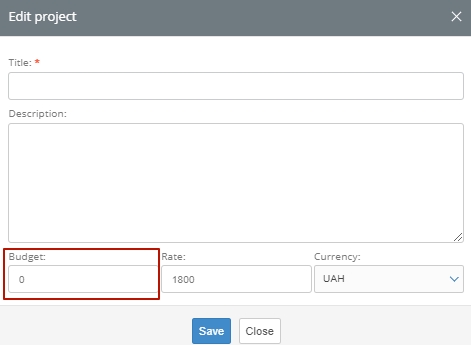
- At the bottom of the task form, enter the Budget and Rate.
- Confirm that the selected Currency matches the project currency.
- Complete the other required fields and click Save.
Change the budget of an existing task
- Find the task in Projects & Tasks. Use the available filters if necessary.
- Open the task or select its edit action.
- Update the Budget or Rate, and confirm the currency.
- Click Save.

Review budget usage
- Open Budget from the top navigation.
- Click the plus icon next to a project to expand its tasks.
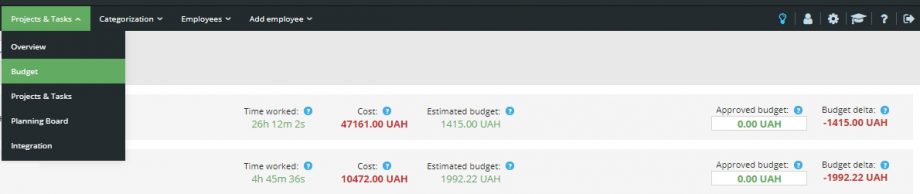
The report shows the principal time and budget indicators:
- Time worked — time recorded for the task;
- Cost — recorded work time multiplied by the applicable rate;
- Estimated budget — the planned total based on task estimates;
- Approved budget — the budget entered for the task or project;
- Budget delta — approved budget minus actual cost.

Budget calculations depend on recorded time and configured rates. Use one project currency consistently so that the report values remain comparable.