
With the help of the Task Budget report, you can analyze the costs for each of the project tasks. You can also edit the spending plan in this menu.
Choose the project you are interested in and expand the page to see the budget by task.
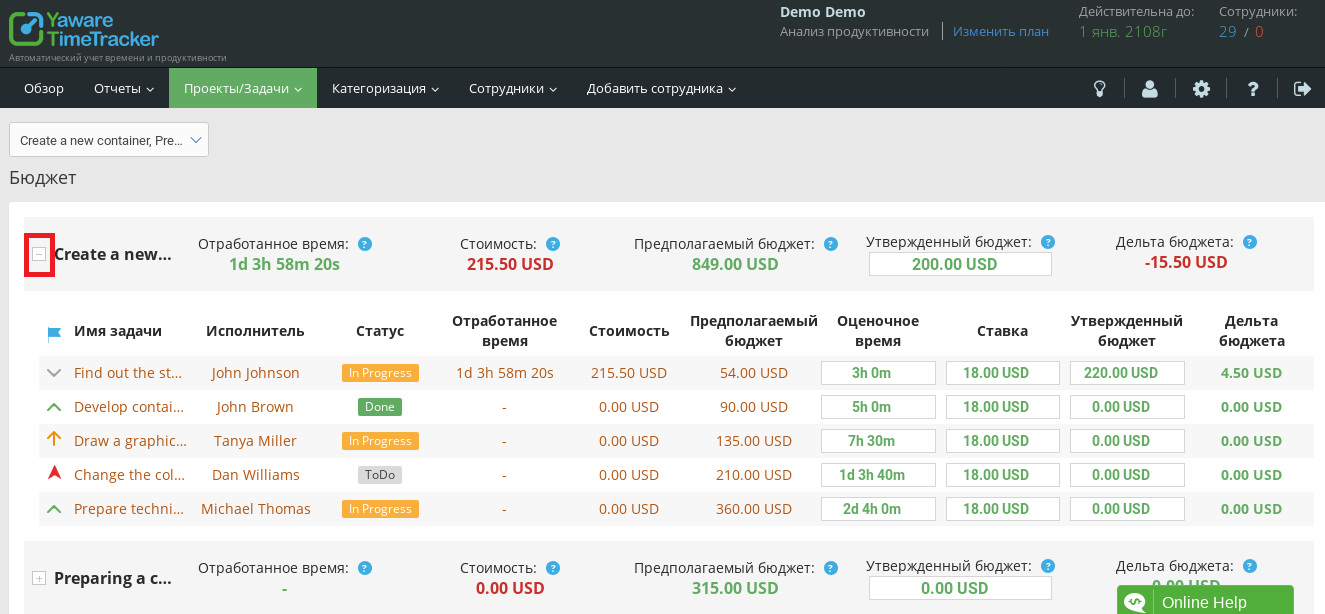
In the task line, you will see the name, performer and status of the task. Time worked shows the actual time spent by the employee to complete the task. The cost of the task is calculated as the product of the hours actually spent on the task and the hourly rate. The estimated task budget is calculated as the product of the hourly rate and the estimated time scheduled for the task. All the listed data are changed by the program depending on other data.

The following data can be edited in the task budget:
- Estimated time allows you to pre-set the time that can be spent on a task. Change the evaluation time in the process of completing the task, if there is a need to increase the time.
- A rate is an hourly payment for a task that can be set before the task starts or during the process. Using the hourly rate, the estimated budget and the final cost of the task are calculated.
- Change the approved budget to plan the costs for the task.
Click on the edit icon in the corresponding field, make changes and click “tick” to save the changes.
 Task budget delta is calculated as the difference between the approved budget and the actual cost of the task. The delta is marked in red if the budget is exceeded.
Edit different task budget parameters manually to plan costs and calculate the optimal budget for each task.